Table management
Digital table plan for your business.
See your venue at a glance: interactive floor plan with all tables, zones, and their current status. Which tables are occupied? What is the revenue per table? Everything in real time.
Nicht bei Google? Tippe einfach deinen Restaurantnamen ein und leg direkt los.
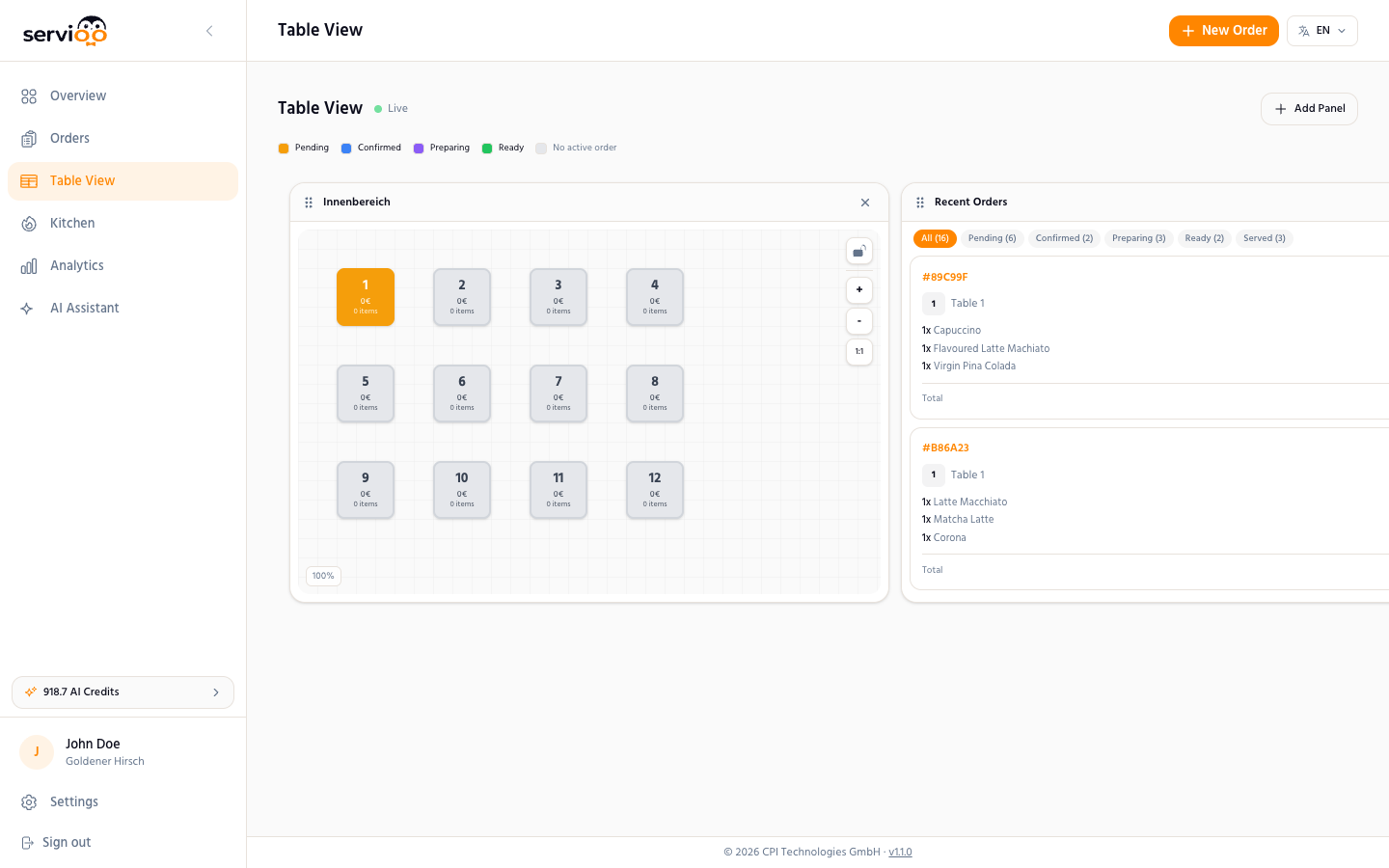
Your venue as an interactive floor plan
The digital table plan from servioo.ai displays your entire floor plan on screen. You place tables via drag & drop, define zones (indoor area, terrace, bar, VIP area), and configure the capacity per table. The floor plan updates in real time: active tables with open orders are highlighted in color, free tables are immediately recognizable.
Real-time revenue per table
At a glance, you can see how much revenue each table has generated so far and how many orders are open. This helps with capacity planning and shows which areas of your venue are most profitable. Combined with the analytics dashboard, you can analyze trends over weeks and months.
Zones and floors
Whether indoor area, outdoor terrace, bar, or VIP lounge — every area of your venue can be defined as its own zone. For venues with multiple floors, servioo.ai also supports multi-floor floor plans. Each zone has its own tables, its own QR codes, and its own revenue statistics.
QR codes and NFC per table
For each table, servioo.ai generates an individual QR code. When scanned, the system automatically knows which table the order comes from. You can print QR codes individually or in batch. As a modern alternative, servioo.ai also supports NFC tags — guests simply hold their smartphone to the tag at the table.
Frequently Asked Questions
Can I create my own floor plan?
Yes. You place tables via drag & drop on a surface and define zones. The floor plan adapts to your venue.
Does the table plan support multiple floors?
Yes. You can create multiple floors/areas and switch between them.
Can I see revenue per table in real time?
Yes. Each table shows current orders, revenue, and status in real time.
How do I generate QR codes for my tables?
In the dashboard under Settings → Tables. You can print QR codes individually or in batch.
Discover more features
Try the table plan free for 14 days
Your venue as an interactive floor plan. Real-time status, revenue per table. No credit card required.
Nicht bei Google? Tippe einfach deinen Restaurantnamen ein und leg direkt los.