AI-powered menu import
Create a digital menu — in minutes, not hours.
Upload a photo or PDF of your existing menu. Our AI automatically recognizes dishes, descriptions, prices, and categories. You review the result, adjust, and go live.
Nicht bei Google? Tippe einfach deinen Restaurantnamen ein und leg direkt los.
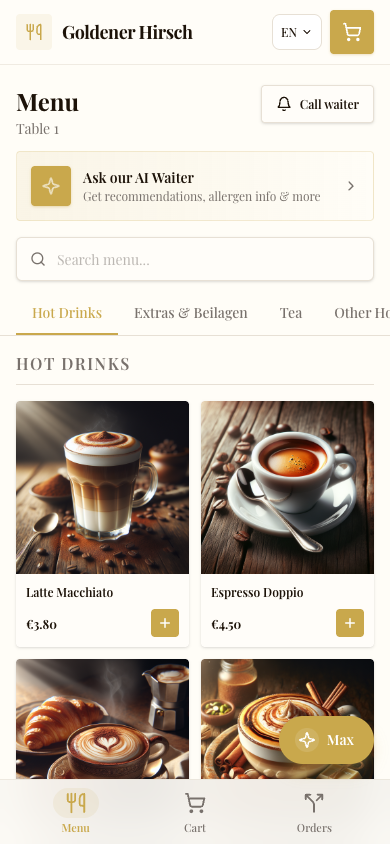
Digitize your menu with AI
The fastest way to a digital menu: photograph your existing menu or upload a PDF. The AI from servioo.ai automatically recognizes dish names, descriptions, prices, and categories. You receive a complete, structured menu that you only need to review and adjust. What used to take hours is now done in just a few minutes.
Multilingual thanks to AI translation
Your menu is automatically translated multilingually — optimized for all languages. The translation is not done by a simple translation tool but by specialized AI that understands culinary terminology. You can review and adjust every translation before publishing.
Digital vs. paper menu
A paper menu is expensive (printing, design, reordering), inflexible (price changes require reprinting), and monolingual. A digital menu is always current, multilingual, automatically includes allergen information, and is free to modify. With servioo.ai, the digital menu is also directly linked to the ordering system — guests order directly from the menu.
Allergen labeling automatically integrated
For each dish, you can select the contained allergens from the 14 EU allergens. These are automatically displayed in the guest view. Guests can even filter by allergens and only see dishes that are safe for them. Combined with the AI waiter, guests can also ask specifically: "Which starters are gluten-free?"
Flexible menu management
Change prices, add dishes, or deactivate items — all in real time, directly in the dashboard. Create categories (starters, main courses, desserts, drinks), sort the order via drag & drop, and add modifier groups (sizes, extras, dietary options). Changes are immediately visible to your guests.
Frequently Asked Questions
How do I create a digital menu?
Upload a photo or PDF of your existing menu. The AI recognizes dishes, prices, and categories automatically. Alternatively, you can enter everything manually.
Can I have my menu translated?
Yes. The AI translates your menu multilingually — optimized for all languages.
How much does a digital menu cost?
The digital menu is included in all servioo.ai plans — from 49.99 EUR/month. AI translations use credits.
Can I change prices and dishes at any time?
Yes. All changes are possible in real time and immediately visible to your guests. No reprinting needed.
Are allergens automatically displayed?
Yes. You mark the allergens per dish, and they are automatically displayed in the guest view and considered by the AI waiter.
Discover more features
Create a digital menu in 10 minutes
Upload your existing menu and let the AI do the rest. 14-day free trial.
Nicht bei Google? Tippe einfach deinen Restaurantnamen ein und leg direkt los.